Workshop diary and bay scheduling
See what is booked, assign work to bays or technicians, and keep the day moving without relying on a paper diary or whiteboard.

Garage management software
LaunchControl helps independent garages, MOT stations, tyre centres, and mobile automotive businesses manage the diary, digital job cards, estimates, invoices, parts ordering, reminders, and customer records in one web-based system.
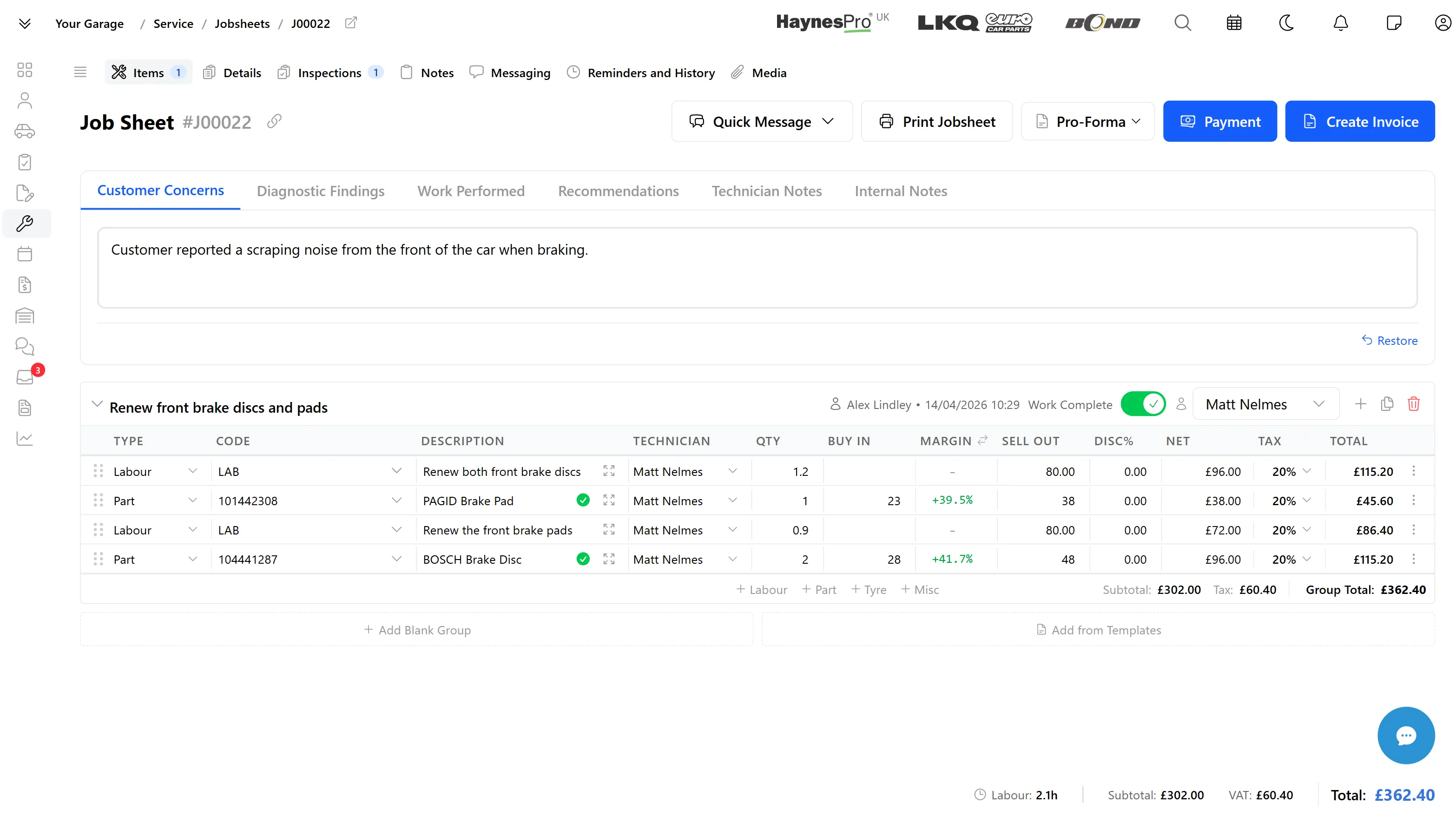
Replace the separate diary, paper job cards, supplier tabs, invoice notes, and reminder spreadsheets with one clear workflow for the whole team.
See what is booked, assign work to bays or technicians, and keep the day moving without relying on a paper diary or whiteboard.
Create jobs quickly, add labour and parts, attach notes, print when needed, and keep the full record connected from estimate to invoice.
Build professional estimates, track customer approval, and convert accepted work into live jobs without retyping the same information.
Raise invoices from completed jobs, track payment status, and keep the customer and vehicle history tied to the financial record.
Connect parts, tyre, accounting, and technical data workflows from the job card, using your existing supplier accounts or licences where required.
Bring customers back with structured service reminders, MOT follow-ups, and communication history stored against the right vehicle.
Vehicle health checks
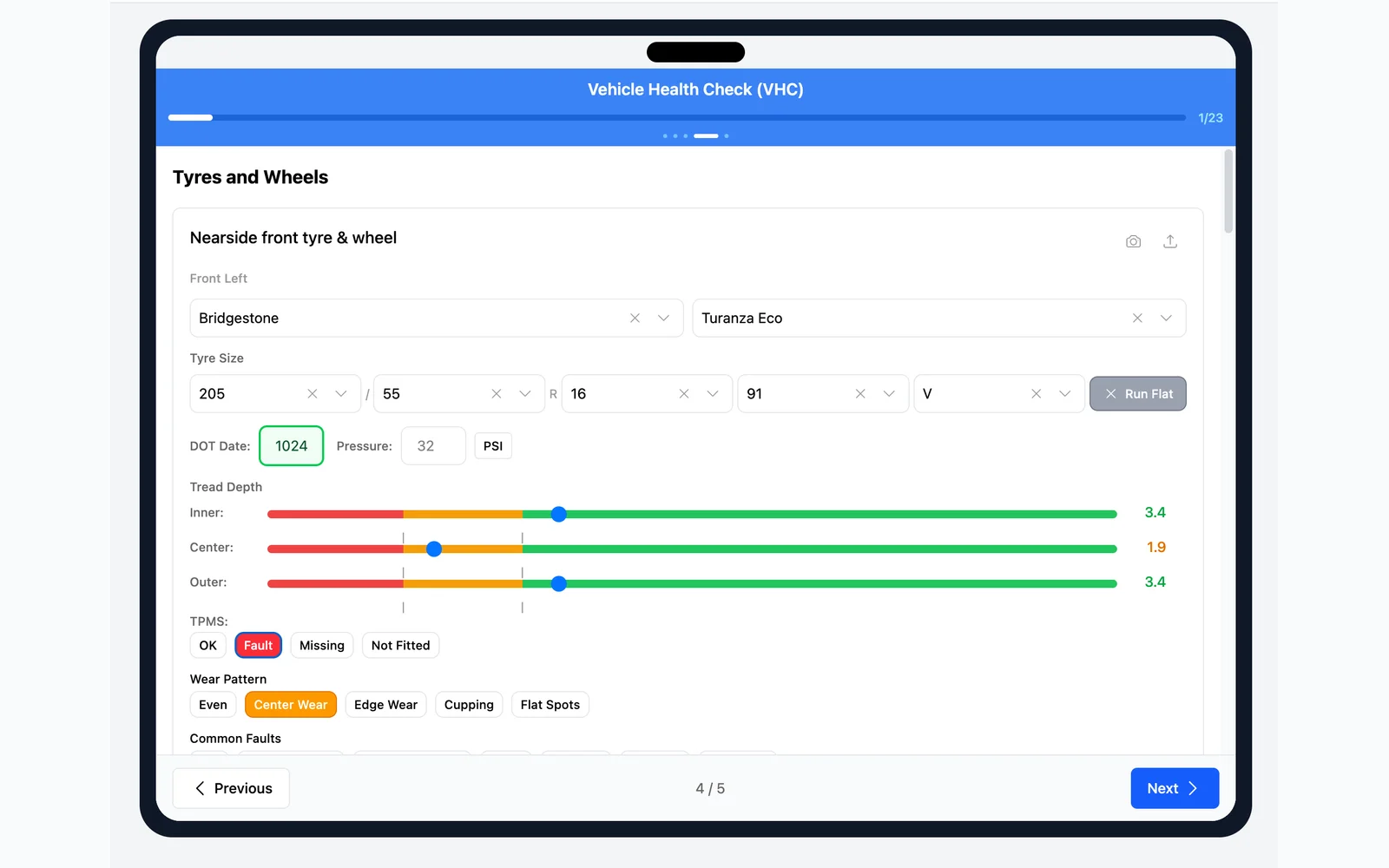
LaunchPad's inspection tool is designed to work on any device your technicians already use. Walk through structured inspections point by point on a tablet propped on the wing mirror or a phone in the pit — no desktop required.
Technicians follow a structured template that walks through each check item. Record pass/fail results, tyre depths, brake measurements, fluid levels, and notes — all from a single full-screen interface.
Capture photos mid-inspection and annotate them with arrows, circles, and freehand drawing. Annotated images are attached to the inspection report for clear, visual evidence customers can trust.
No searching through menus. Type a vehicle registration to start a new inspection instantly. The correct template loads automatically based on the vehicle and your workshop's configuration.
Technician phones and tablets
LaunchPad strips away everything a technician doesn't need. Your team sees their assigned jobs, runs guided inspections, updates task status, and adds notes and photos — all from any device with a browser.
LaunchPad opens with a personalised dashboard showing assigned jobsheets and pending inspections for today. Technicians see vehicle registrations, job status, and booking dates at a glance — tap any item to go straight to it.
Technicians see only the jobsheets assigned to them, filtered to exclude future bookings and completed jobs. Each jobsheet shows the vehicle, status, work groups, customer concerns, and technician notes. Mark work groups complete directly from the job card.
View customer concerns attached to each jobsheet, add technician notes for the service advisor, and see internal notes from management. Notes are visible from the jobsheet detail view alongside work items and media.

Website and online booking
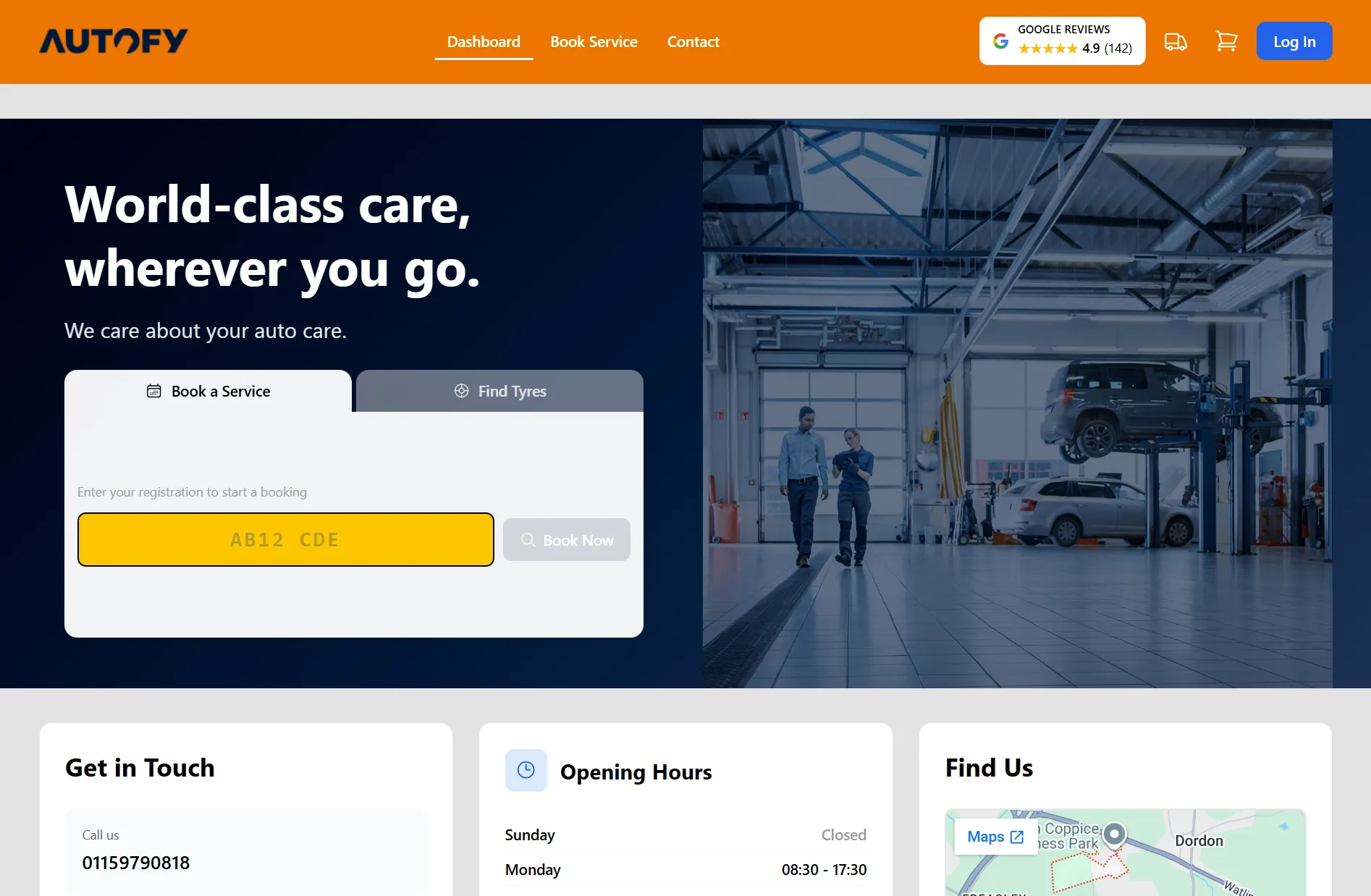
Build a professional, SEO-friendly workshop website with online booking, tyre search, and estimate requests — ideal for workshops establishing their online presence for the first time. Give customers a self-service portal with service history, estimate approval, and complete transparency.
Build a fully branded, SEO-optimised workshop website from professional templates or from scratch. Add custom pages, showcase your services and manage your entire online presence. No web developer needed.
Guided experience from location selection and DVLA vehicle lookup through service browsing, date availability, customer details auto-fill, tyre delivery constraints, and booking review before submission.
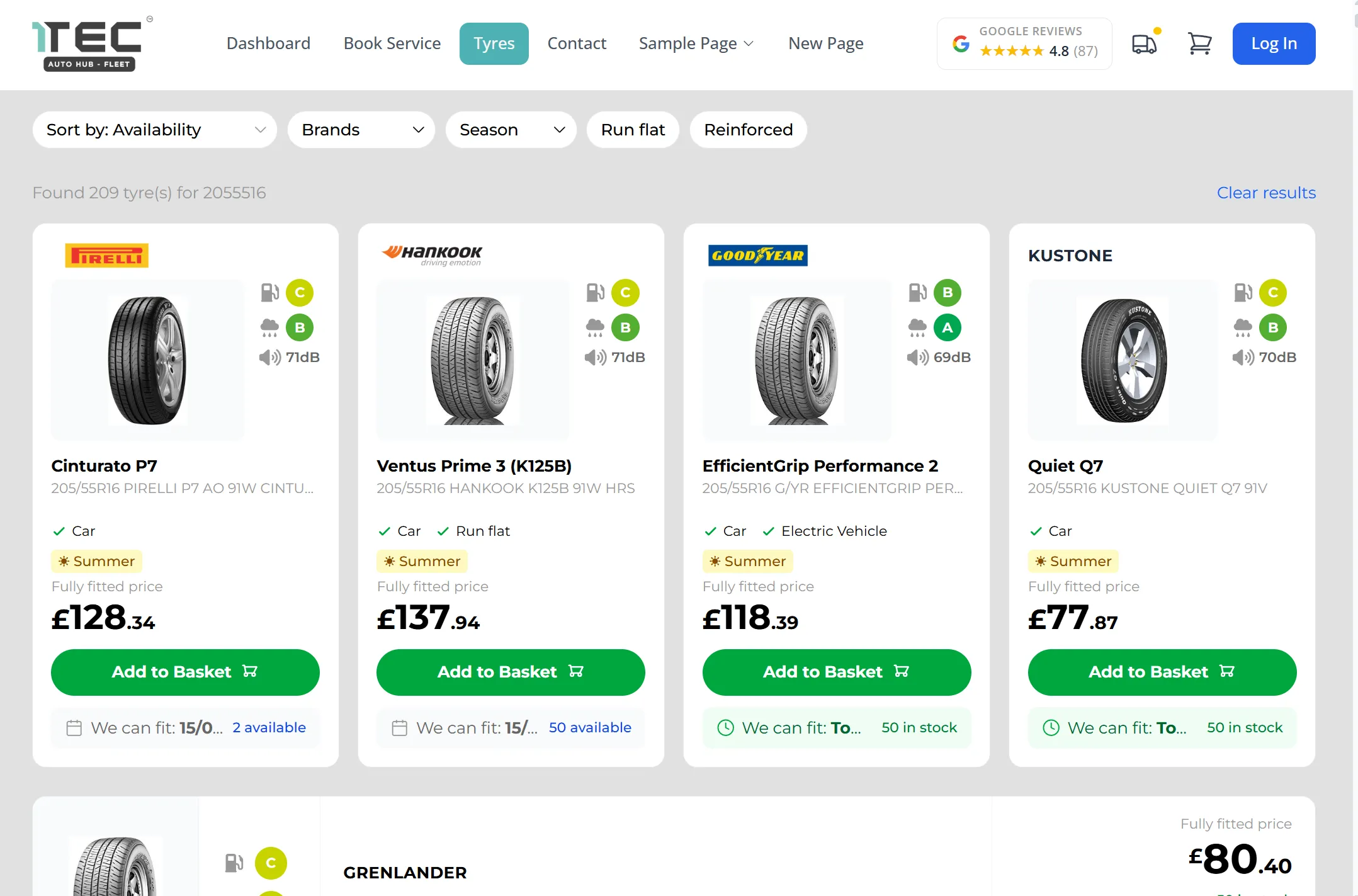
Let your customers browse and buy tyres directly on your website. They search by size, filter by brand, season and budget, then book a fitting at your garage. Tyres are delivered straight to your workshop ready for the appointment.

HaynesPro technical data
Use your HaynesPro licence to open repair manuals, service schedules, bulletins, engine locations, and manufacturer data without breaking the job flow.
HaynesPro data requires an active HaynesPro licence. If your licence is supplied through LKQ Euro Car Parts, it can be connected inside LaunchControl.
Step-by-step repair instructions with detailed diagrams, torque specifications, and safety warnings for thousands of vehicle models.
Manufacturer-specified maintenance schedules with part numbers, fluid specifications, and interval recommendations you can trust.
Complete vehicle specifications including engine data, capacities, dimensions, and performance figures for accurate servicing.


LKQ Euro Car Parts ordering
Search LKQ Euro Car Parts by category, vehicle, or part number, compare branch stock and delivery, and add parts straight onto job cards inside LaunchControl.
Live ordering requires your own LKQ Euro Car Parts trade account. Orders, pricing, terms, and rebates stay tied to that account.
Check stock levels instantly across ECP's national branch network. See what's available locally, what can be transferred, and expected delivery times before you commit.
Get current trade pricing and special offers directly in your system. No separate logins, no manual lookups — pricing is always up to date.
Place orders directly from job cards with a single click. Orders are tracked, receipted, and linked to the correct job automatically.



Built for UK independent garages
The page does not need another feature list. This is the practical fit: smaller UK teams handling bookings, jobs, tyres, annual reminders, customer history, and supplier lookups from the same browser-based system.
Built for owners, service advisors, and technicians who need a clear workflow without per-user pricing or heavy implementation work.
Keep service and annual inspection follow-up connected to the customer and vehicle record, then send customers back into online booking.
Parts, tyres, accounting, payments, and technical data sit closer to the job card instead of being copied between separate portals.
Switch without the admin headache
Send us a usable export from your current system, spreadsheet, or customer list. We normally import customer, vehicle, and history data within one working day, with no migration charge.
Data migration is included, so there is no setup fee just to move your workshop records into LaunchControl.
Once we receive a usable export, most customer and vehicle data imports can be completed within one working day.
We help you get the team set up, check imported records, and start using the diary, jobs, invoices, and reminders with confidence.
The biggest gain is not just going digital. It is giving the team one shared system that keeps work visible from booking to payment.
LaunchControl
Bookings, bays, technicians, job cards, and progress are visible in one workflow.
Paper or separate tools
Information is split between diaries, whiteboards, job sheets, and memory.
LaunchControl
Vehicles, invoices, notes, messages, and reminders stay connected to the right customer.
Paper or separate tools
History is harder to search and often spread across folders, phones, and spreadsheets.
LaunchControl
Parts, tyres, technical data, and accounting workflows can be connected from the job flow using the relevant account or licence.
Paper or separate tools
The team switches between supplier portals and copies details back by hand.
LaunchControl
Invoices are raised from completed jobs with payment status visible to the team.
Paper or separate tools
Invoices can lag behind the work and payment status is harder to track.
LaunchControl
Service and MOT reminders help bring customers back without rebuilding lists manually.
Paper or separate tools
Follow-up depends on spreadsheets, calendar notes, or someone remembering.
LaunchControl
One flat workshop subscription with unlimited users and no per-module tiers.
Paper or separate tools
Low software cost, but higher admin time and less visibility as the workshop grows.
| Capability | LaunchControl | Paper or separate tools |
|---|---|---|
| Diary and job cards | Bookings, bays, technicians, job cards, and progress are visible in one workflow. | Information is split between diaries, whiteboards, job sheets, and memory. |
| Customer history | Vehicles, invoices, notes, messages, and reminders stay connected to the right customer. | History is harder to search and often spread across folders, phones, and spreadsheets. |
| Supplier lookups | Parts, tyres, technical data, and accounting workflows can be connected from the job flow using the relevant account or licence. | The team switches between supplier portals and copies details back by hand. |
| Payments and invoices | Invoices are raised from completed jobs with payment status visible to the team. | Invoices can lag behind the work and payment status is harder to track. |
| Reminders | Service and MOT reminders help bring customers back without rebuilding lists manually. | Follow-up depends on spreadsheets, calendar notes, or someone remembering. |
| Users and pricing | One flat workshop subscription with unlimited users and no per-module tiers. | Low software cost, but higher admin time and less visibility as the workshop grows. |
Garage management software helps workshops manage bookings, job cards, estimates, invoices, customer records, vehicle history, reminders, and reporting in one system. LaunchControl is built for independent UK workshops that want a practical alternative to paper diaries and disconnected tools.
Simple monthly pricing
One flat monthly subscription for LaunchControl, LaunchPad, LaunchBay, unlimited users, online booking tools, customer portal, reminders, and the core workshop workflow.
Per workshop
£49/month
Third-party services such as HaynesPro, LKQ Euro Car Parts, payment providers, and accounting tools may require your own account, licence, or supplier terms.