
Automated Reminders in LaunchControl: Benefits and Features
Workshops live or die by getting customers back through the door. The diary you have today is the result of decisions a customer made weeks or months ago, and the diary you have next month depends on whether those customers think to come back to you when their annual inspection, service, or recommended work is due.
Reminders are the simplest, highest-leverage tool any workshop has for retaining customers and keeping the diary full. They cost almost nothing to send, they reach customers at exactly the right moment, and they remove the single biggest reason customers drift to a competitor: forgetting.
This post covers two things: why reminders matter, and exactly what is built into LaunchControl today.
Why Reminders Matter
They protect your customer base
If you have 2,000 active customers and even 10% drift away each year because nobody prompted them, that is 200 customers you have to replace just to stand still. New customer acquisition is expensive. Holding onto the customers you already have is almost free, and reminders are the mechanism that does it.
They reach customers at exactly the right moment
A reminder for an annual inspection three weeks before the due date is not marketing. It is a useful prompt. The customer was going to need an annual inspection regardless. By reaching them first, you become the obvious choice rather than whoever appears at the top of a Google search at the last minute.
Customers now expect to be reminded
Modern customers are reminded about everything by every business they interact with. A workshop that does not send reminders looks behind the curve compared to dealers, national chains, and the wider services people deal with day to day. Reminders are no longer a nice-to-have. They are the baseline customers expect from anyone they do regular business with, and the absence of them quietly chips away at the impression you give of being a serious, professional outfit.
They increase the lifetime value of every customer
A customer who books once is worth a single visit. A customer who comes back for every annual inspection, every annual service, and every recommended item is worth thousands of pounds over the lifetime of the relationship. Reminders are the mechanism that converts a one-time visitor into a regular, and a regular into a long-term customer who recommends you to friends and family. Higher lifetime value means each customer covers more of your fixed costs and contributes more to profit. The same workshop, with the same team and the same overheads, makes more money simply by hanging onto customers longer.
They make a workshop look professional
A customer who receives a polite, well-timed reminder feels looked after. They are more likely to recommend you, less likely to shop around on price, and more likely to approve the next round of recommended work because they trust you to track their vehicle properly.
They remove admin from your team
Manual reminders mean somebody scrolling through a spreadsheet every Friday afternoon, missing the easy ones, forgetting the harder ones, and never quite getting around to it during a busy week. Automated reminders run regardless of how busy the workshop is.
Workshops with automated reminders typically see significantly higher rebooking rates than those without. Start your free 28-day trial and let your reminders run themselves.
What Is Built Into LaunchControl
LaunchControl includes a complete reminder system as part of every subscription. There are no add-on fees, no per-message charges from us, and no premium tier to unlock it. Here is what is actually in the platform today.
Reminder types tailored to your workshop
You can create reminder types for whatever recurring items matter to your customer base. annual inspection, road tax, annual service, brake fluid, cabin filter, AC re-gas, timing belt, coolant change, EV battery health checks: anything that should bring a customer back through the door at a known interval. Each reminder type can be configured with:
- A code and display name
- A description shown on the reminder list
- A default lead time in days
- A colour (ten predefined options) for quick visual identification
- An optional link to a job type, so reminders feed into your booking and reporting flows
- An active / inactive toggle for retiring reminder types without deleting historic data
- A notification method (email, SMS, both, or none)
System reminder types are locked from accidental deletion. Custom ones are fully editable.
Auto-attach to every new vehicle
This is the feature that closes the gap most workshops have today. When a reminder type is marked as auto-attach, a blank reminder of that type is created automatically the moment a new vehicle is added to the system. Dates and mileages get populated as data flows in. There is no chance of "we forgot to set up the annual inspection reminder for that customer" because the placeholder was created the second the vehicle existed.
VRM-driven date population
Adding a vehicle by registration number triggers a VRM lookup that pulls annual inspection and tax dates from authoritative sources. The reminder dates are populated automatically. No transcription, no calendar maths, no chance of getting it wrong.
A central reminders list
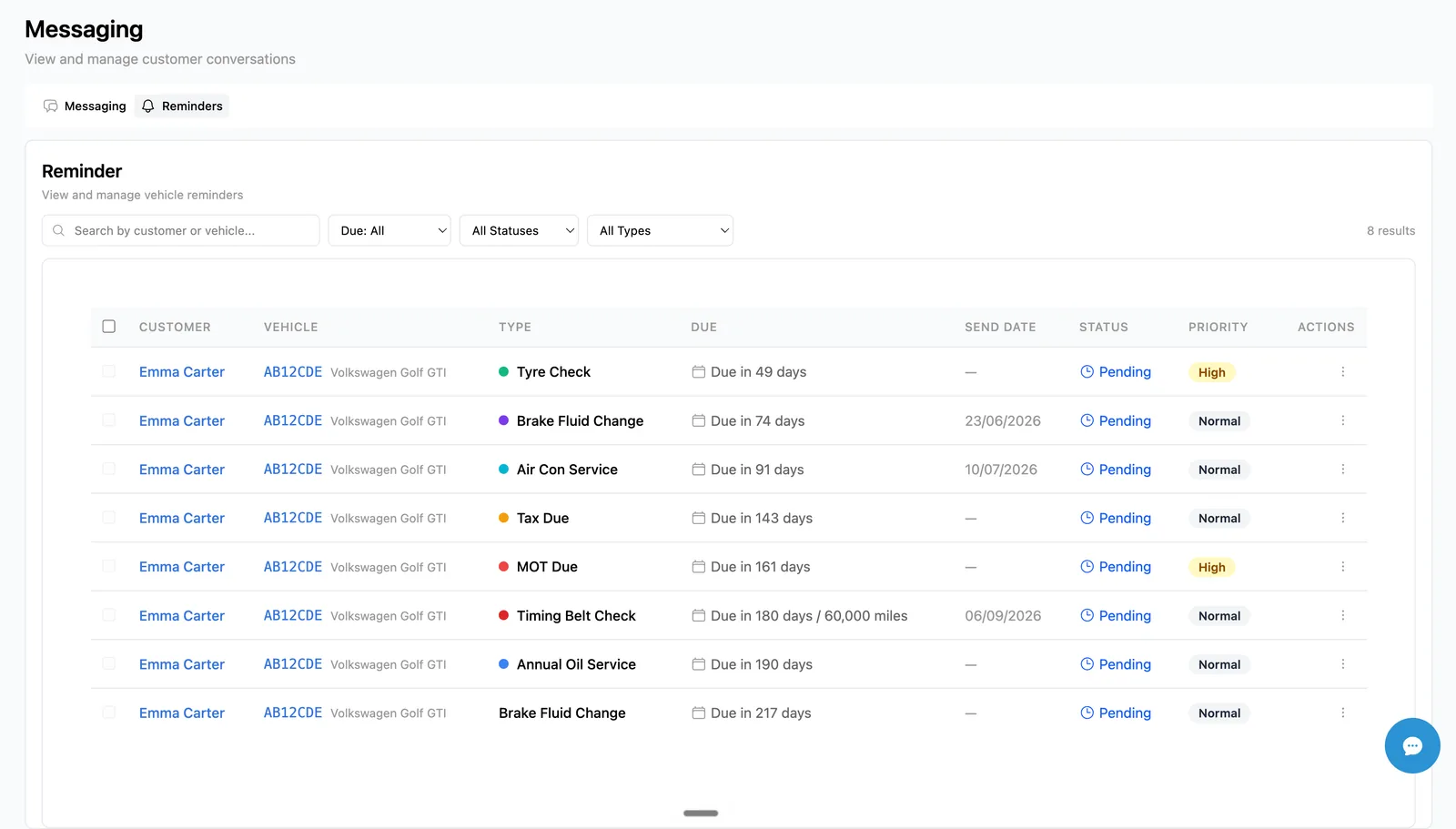
The reminders list view inside LaunchControl is where day-to-day management happens. Across the whole organisation, you can:
- Search by customer name or vehicle registration
- Filter by due date: Overdue, Due Today, Due This Week, Due This Month, Due in 90 Days
- Filter by status: Pending, Overdue, Ready to Send, Completed, Dismissed
- Filter by reminder type: quickly isolate just annual inspection, just tax, just timing belts
- Bulk select reminders that are ready to send and dispatch them in one go
Statuses that reflect real workshop reality
Each reminder moves through a clear lifecycle:
- Pending: created, waiting for the due date to approach
- Overdue: past due date, no notification sent yet
- Ready to Send: inside the lead-time window, queued for dispatch
- Processing: currently being sent
- Completed: actioned, customer is booked in or the work has been done
- Dismissed: manually cancelled because the reminder no longer applies
Status transitions are visible in the list, so you always know where every reminder sits.
Email and SMS notification channels
Each reminder type can dispatch on email, SMS, both, or neither. Templates are workshop-managed: you set the wording once for each reminder type and channel, and every dispatched reminder uses that template with variables filled in for:
- Customer first name, last name, company name
- Vehicle registration, make, model, year
- Due date
- Workshop name and primary location
SMS goes through an integrated SMS gateway. Email goes through the workshop's configured sender. Both are tracked, so you can see exactly when a notification was dispatched.
Per-customer opt-out for SMS and email
Customers can be flagged as opted-out from SMS reminders or email reminders independently. The dispatch logic respects those flags. If a customer has opted out of SMS, the SMS channel is skipped even if the reminder type is set to "both". This keeps your workshop on the right side of GDPR and PECR marketing rules without the team having to remember.
Smart skips that prevent embarrassment
The dispatch logic also skips reminders that no longer make sense:
- Customer is already booked in for the same job? The reminder holds. No "your annual inspection is due" message arriving the morning of the actual annual inspection.
- No phone number on the customer record? SMS is skipped.
- No email on the customer record? Email is skipped.
- Notification already sent for that reminder? It does not get sent again.
Manual or automatic dispatch
Each organisation has an auto-send setting. With auto-send enabled, the system dispatches due reminders every hour without anyone in the workshop touching it. With auto-send disabled, the workshop reviews ready-to-send reminders and dispatches them manually, in bulk, on whatever cadence suits the team.
This matters because some workshops want full automation, while others prefer a final human review before anything goes out. LaunchControl supports both.
Hourly background processing
A cron worker runs every hour to:
- Mark Pending reminders that have passed their due date as Overdue
- Identify reminders inside the lead-time window
- Dispatch notifications for organisations with auto-send enabled
- Process organisations independently for tenant safety
The cron schedule is configurable, so the cadence can be tuned. The default of every hour is more than enough for the vast majority of workshops.
Customer portal display in LaunchBay
The customer-facing side of reminders shows up in LaunchBay, the customer portal. When a customer logs in, they see their vehicles with colour-coded status indicators for annual inspection, tax, and service. Red means overdue, amber means due soon, green means valid. From there, they can book directly through your online booking flow without phoning the workshop.
This closes the loop. The reminder reaches the customer, the customer follows the link, the customer lands on their personal portal, and the customer books in. No phone tag, no forgotten messages, no missed bookings.
What This Means for Your Workshop
A workshop with reminders set up properly captures bookings that would otherwise go to a competitor, recovers deferred work that would otherwise be forgotten, and looks more professional than competitors still relying on the customer to remember everything themselves.
It also takes time off the team. Once reminder types are configured at the start, there is no daily, weekly, or monthly task list. The system runs in the background, dispatches reminders when they are due, respects customer preferences, and feeds bookings into your diary automatically.
For more on the customer-retention angle and how reminders fit into the wider booking pipeline, see our deeper guide on annual inspection and service reminders.
Getting Started
If you are already on LaunchControl, reminders are sitting in your platform ready to switch on. The country defaults are pre-loaded. Add the workshop-specific reminder types your customer base needs, set lead times, attach SMS and email templates, and decide whether you want auto-send or manual dispatch.
If you are new to LaunchControl, reminders are part of every subscription, alongside digital job cards, online booking, digital vehicle inspections, and the LaunchBay customer portal. One subscription, every feature, no per-user fees.
LaunchControl includes a complete reminder system at no extra cost. Start your free 28-day trial and bring customers back automatically.